

Step 3: Facts
In the third step, Writer automatically researches relevant facts for your proposal. This information comes from your Hub, public sources, and can be supplemented through targeted search queries.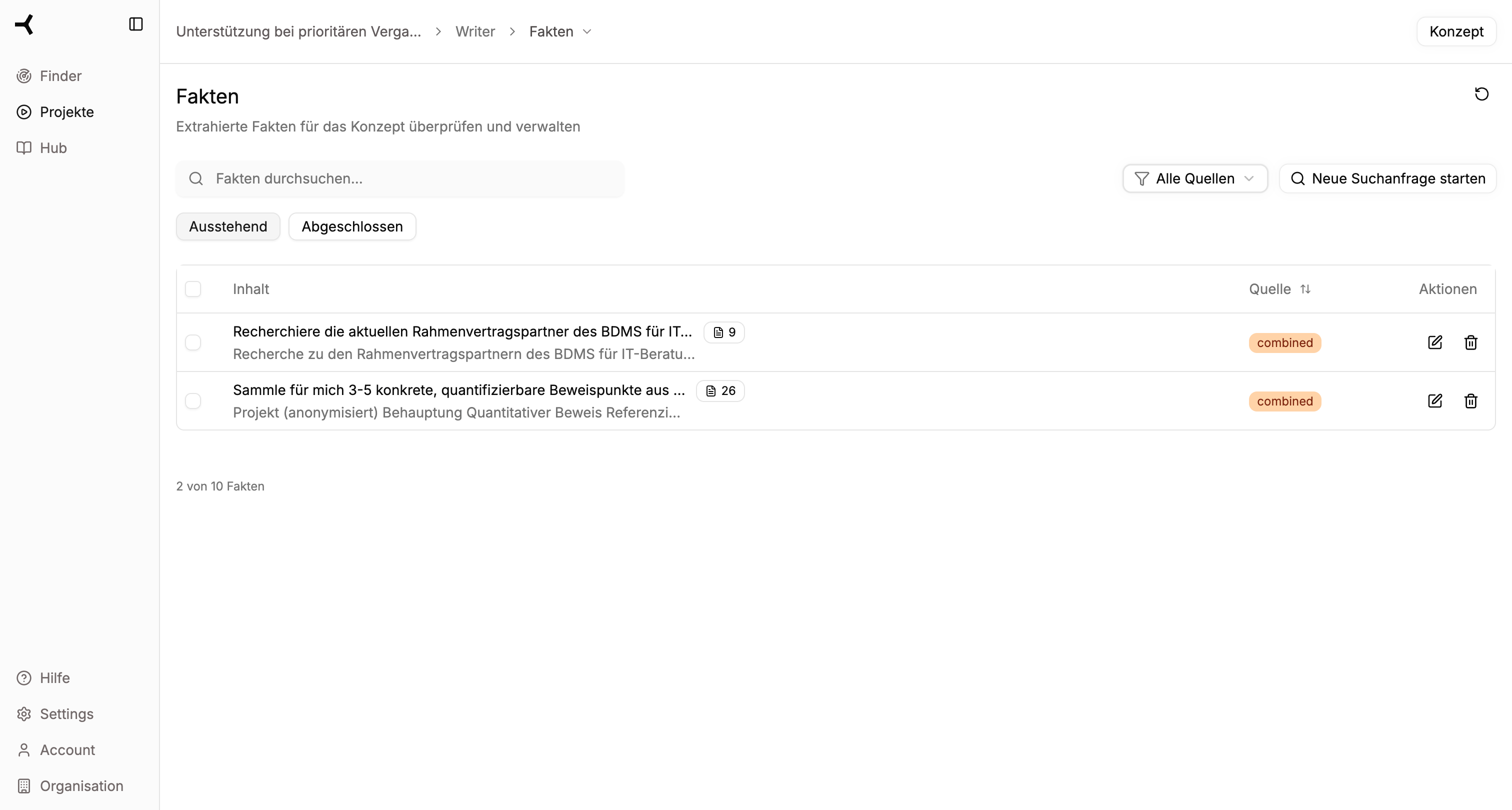
Research Sources
Writer uses various sources for fact research:Hub
Your company-specific information: certifications, employee profiles, project references, financial data
Public Sources
Relevant information from the internet, trade publications, and public databases
Expert Knowledge
AI-generated analyses and summaries based on the context of your tender
Facts Overview
Status Tabs
Facts are divided into two categories:| Tab | Meaning |
|---|---|
| Pending | Facts that still need to be reviewed |
| Completed | Already reviewed and confirmed facts |
Table Columns
| Column | Content |
|---|---|
| Content | The researched information with search query and result |
| Source | Origin of the information (Hub, Web, Combined) |
| Actions | Buttons for reviewing or deleting |
Reviewing Facts
1
View Pending Facts
Switch to the “Pending” tab to see all facts that haven’t been reviewed yet.
2
Review Fact
Click the review icon (eye) on a fact to display the details.
3
Evaluate Content
Check whether the information:
- Is correct
- Is relevant for your proposal
- Is current
4
Make Decision
- Confirm: Fact will be used for concept creation
- Delete: Fact will be discarded and not used
Starting New Search Queries
You can start new search queries at any time to research additional facts:1
Click Button
Click “Start New Search Query” in the upper right corner.
2
Formulate Query
Describe what information you need. Be as specific as possible:Good: “Find all ISO certifications of our company with validity dates”Less good: “Find certifications”
3
Wait for Research
The AI searches all available sources and presents the results.
4
Review Results
The new facts appear in the “Pending” tab and can be reviewed as usual.
Filters and Search
Searching Facts
Use the search field at the top to search through existing facts. The search covers both search queries and results.Filter by Source
With the source filter, you can limit the display:- All Sources – Shows all facts
- Hub – Only facts from your Hub
- Web – Only facts from public sources
- Combined – Facts merged from multiple sources
Parallel Queries
Writer runs multiple research queries in parallel to save time:- While you’re reviewing one fact, further research runs in the background
- The counter at the bottom shows progress: “X of Y facts”
- New results automatically appear in the list
Depending on the complexity of the tender and the size of your Hub, fact research may take a few minutes. You can start reviewing while further research is running.
Common Source Types
Hub Sources
Hub Sources
- Employee profiles and qualifications
- Project references and case studies
- Certifications and certificates
- Company data and metrics
- Writer rules (company-specific guidelines)
Web Sources
Web Sources
- Industry reports and statistics
- Technical documentation
- Legal frameworks
- Market analyses
Combined Sources
Combined Sources
- Synthesis from Hub and Web
- AI-generated summaries
- Contextualized analyses
Continue to Concept
Once you’ve reviewed all relevant facts, click “Concept” (top right) to start text generation.Continue to Step 4: Concept
Generate and edit proposal text