

Step 2: Writing Plan
In the second step, you create the Writing Plan for your proposal. Here you define the chapter structure, set page specifications, and give the AI precise instructions on how each section should be written.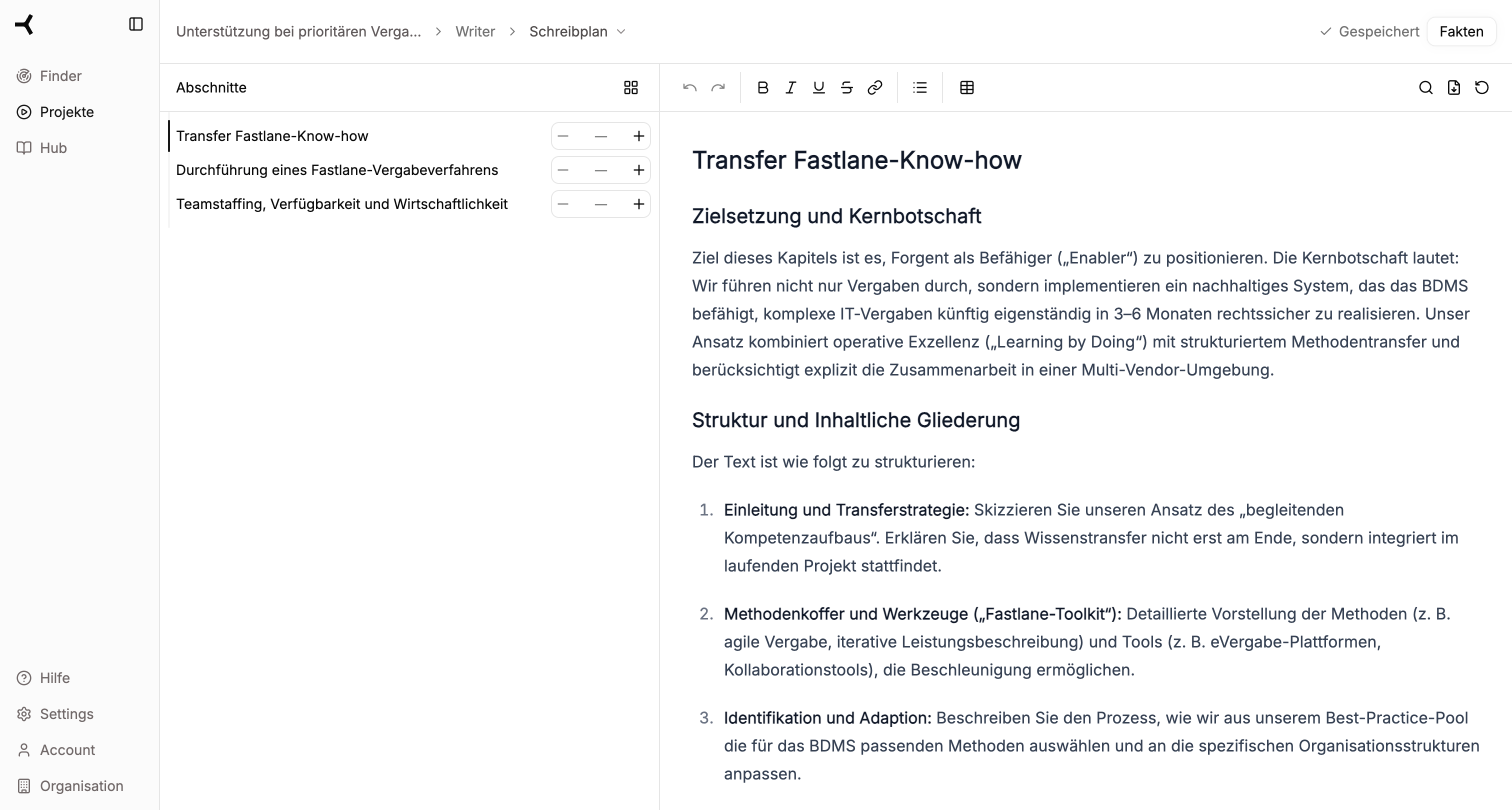
Screen Overview
| Area | Position | Function |
|---|---|---|
| Chapter List | Left | Overview of all chapters with page controls |
| Writing Instructions | Right | Detailed instructions for the selected chapter |
Managing Chapters
Adjusting Page Controls
For each chapter, you can set the page count:- Click
+or-next to a chapter to increase or decrease the page specification - The total page count is automatically calculated and displayed at the top
- Consider any page specifications from the tender
Changing Chapter Structure
In the Writing Plan, you can adjust the structure of your proposal:- Add Chapter – Click the
+symbol to insert a new chapter - Remove Chapter – Delete unnecessary chapters
- Change Order – Drag and drop chapters to the desired position
Defining Writing Instructions
For each chapter, you define writing instructions that serve as a guide for the AI:Structure of Instructions
1
Select Chapter
Click on a chapter in the left list to edit its instructions.
2
Formulate Objective
Describe the goal of the chapter. What should the reader understand after reading?
3
Specify Structure
Define the desired structure:
- Which subsections should the chapter contain?
- In what order should the topics be covered?
4
Specific Notes
Add specific instructions:
- What points must be mentioned?
- Are there requirements from the tender that need to be addressed?
- What tone should the text have?
Direct Text Editing
You can edit the writing instructions directly in the text field:- Click in the text field and write your instructions
- Format with the toolbar (bold, italic, lists, etc.)
- Changes are saved automatically
Using AI Adjustments
Use the Forgent symbol (✨) for AI-assisted adjustments:- Click on the Forgent symbol next to a text section
- Choose an adjustment option (e.g., “Shorten”, “Expand”, “Rephrase”)
- The AI generates a suggestion that you can accept or reject
AI adjustments in the Writing Plan refer to the instructions, not the final proposal text. Use this feature to formulate more precise specifications.
Best Practices for Writing Instructions
Be Specific
Be Specific
Instead of “Describe the team”, better: “Present 3-4 key people with their role, qualifications, and project experience. Emphasize relevant certifications.”
Reference Requirements
Reference Requirements
Refer to specific requirements from the tender: “Explicitly address the ISO 27001 certification requirement from Section 3.2.”
Give Examples
Give Examples
“Structure as follows: 1. Introduction (1/4 page), 2. Methodology (1/2 page), 3. Implementation plan (1/4 page).”
Define the Tone
Define the Tone
“Professional, factual tone, no marketing language. Focus on concrete benefits and evidence.”
Continue to Facts
Once you’ve defined all chapters and formulated the writing instructions, click “Facts” (top right) to start researching.Continue to Step 3: Facts
Research and verify relevant information